What is Orchestra
Orchestra is CTHINGS.CO’s ecosystem for controlling connected devices, managing their applications and operating systems, and visualising and monitoring data. It takes a security-first approach to connectivity to support both critical and everyday systems. Teams gain control and visibility across the solution, from its platforms and networks to the operating systems running on edge devices.
The Orchestra Ecosystem consists of:
Orchestra Manager
Orchestra Data Collection
Identity Platform (IDP)
OrchestraOS
Orchestra SDN (OSDN)
The Orchestra platforms
Orchestra Manager
Manager is the application for managing Linux devices and the applications running on them. Teams can enrol devices, inspect metrics and logs, use remote terminal access, release container applications through Containerized Application Lifecycle Management (CALM), and roll out compatible RAUC system updates.
Orchestra Data Collection
Data Collection receives device and sensor measurements through configured MQTT brokers and topics. Users define how payloads are interpreted and build dashboards, floorplans and historical views from data published by sensors, gateways or applications.
Identity Platform (IDP)
The Identity Platform provides shared sign-in, tenant membership and role-based permissions for the Orchestra platforms. It manages user access and machine clients for service integrations; a tenant groups an organisation’s users and resources.
Device software and connectivity
OrchestraOS
OrchestraOS is a Yocto-based Linux distribution for edge devices, with support for applications, containers and RAUC system updates on compatible hardware. It integrates with Orchestra Manager and OSDN for remote management.
Manager also supports compatible Linux distributions, such as Debian, that meet the device prerequisites. This allows teams to work with their existing hardware and software alongside OrchestraOS devices.
Orchestra SDN
Orchestra SDN provides managed connectivity between edge devices and management and data services across sites. Device provisioning establishes the network connection and configures certificate-based SSH access for remote operations.
How the components work together
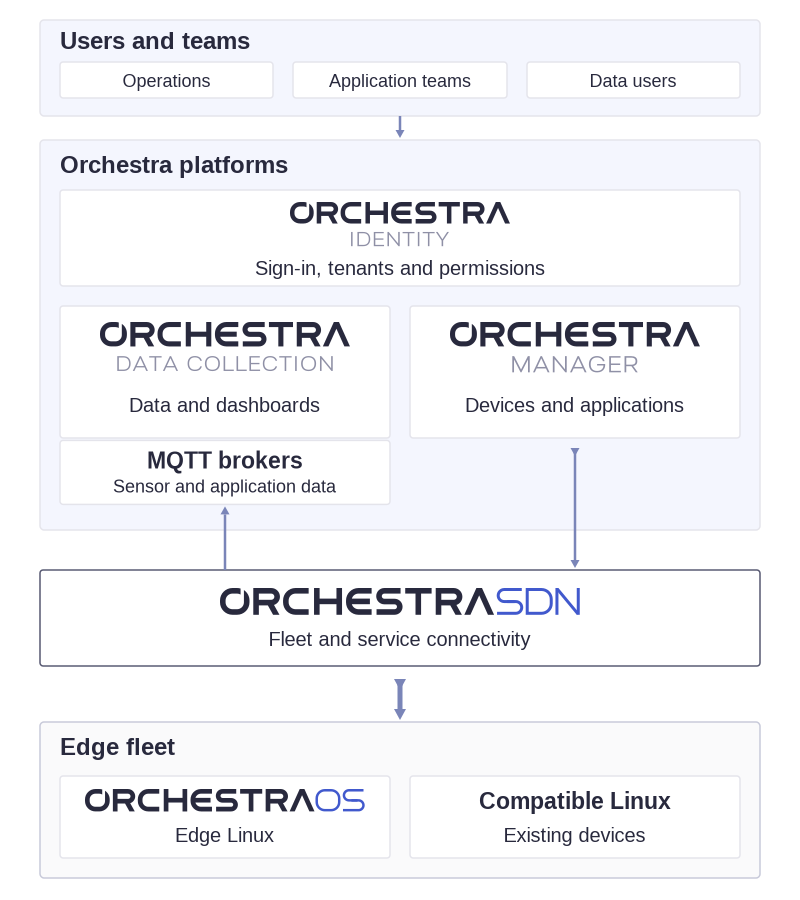
Orchestra Ecosystem overview
Users sign in through IDP and work within their tenant in Manager or Data Collection. The edge fleet connects through OSDN to Manager and MQTT brokers. Manager coordinates device operations over this network, while Data Collection receives measurements from the configured brokers. Available operations depend on permissions, enabled features and device capabilities.
A gateway running OrchestraOS can host an application deployed by Manager and publish measurements through OSDN to an MQTT broker configured in Data Collection. The same ecosystem therefore supports both fleet operations and the use of application and sensor data.
A typical workflow
Set up access. Create or join a tenant and give team members the permissions they need.
Enrol devices. Add Linux devices to Manager and complete their provisioning so they can be reached and managed.
Deploy applications. Group devices into fleets, configure compositions and release the application versions you want them to run.
Operate the fleet. Review status, metrics and logs, use remote access for troubleshooting, and roll out compatible system updates when needed.
Use the data. Configure MQTT connections and device data in Data Collection, then build dashboards or floorplans around the measurements.